ProtoPie AI
Where I sit at ProtoPie
My job at ProtoPie is hard to draw a box around. As a Creative Technologist, I build high-fidelity interactive prototypes for enterprise clients, lead live demos and webinars, and push the tool to its limits daily. When something frustrates me in the tool, I walk it to our product team and sit with the dev team to help build the fix, bridging what users need with what gets shipped.
ProtoPie AI put me on both sides of that work. I contributed to the AI feature's development by building the RAG knowledge base of design component patterns and helping design the multi-phase pipeline architecture. Then I led the global launch webinar, three sessions for AMER, EMEA, and APAC. Back office to front office, from build to launch.
Prototypes made with ProtoPie
The problem we were solving
ProtoPie is an interaction design tool. Designers build prototypes by combining layers, triggers, and responses. It's powerful, and it's manual. A simple "button that fades on tap" requires selecting the layer, adding a Tap trigger, adding an Opacity response, and configuring the target value and duration. For complex interactions, that becomes dozens of steps across multiple panels.
In 2025, AI prototyping tools started appearing everywhere. Clients kept asking us about them. Internally, we felt the pressure. But after I tried those tools myself, I noticed a pattern: they all generated outputs you couldn't take apart. You'd describe an interaction in natural language, get something approximate, and then re-prompt until you gave up or settled. The output was locked. You couldn't open it up and adjust one timing curve or add a conditional branch.
ProtoPie already had a system for building precise interactions. Triggers and responses. The building blocks existed. The question we landed on was whether AI could fill in those building blocks from a designer's description, and give back something the designer could still open up and change piece by piece.
That's what ProtoPie AI does. A designer describes what they want in the chat panel. The AI reads the current prototype structure, figures out which triggers and responses to create, executes them on the canvas in real time, and summarizes what it did. Everything it generates uses the same interaction system as manual building. If the scroll physics feel off, you open the response and adjust the timing. You don't re-prompt. You just change it.
Authoring agent building interactions from a user prompt
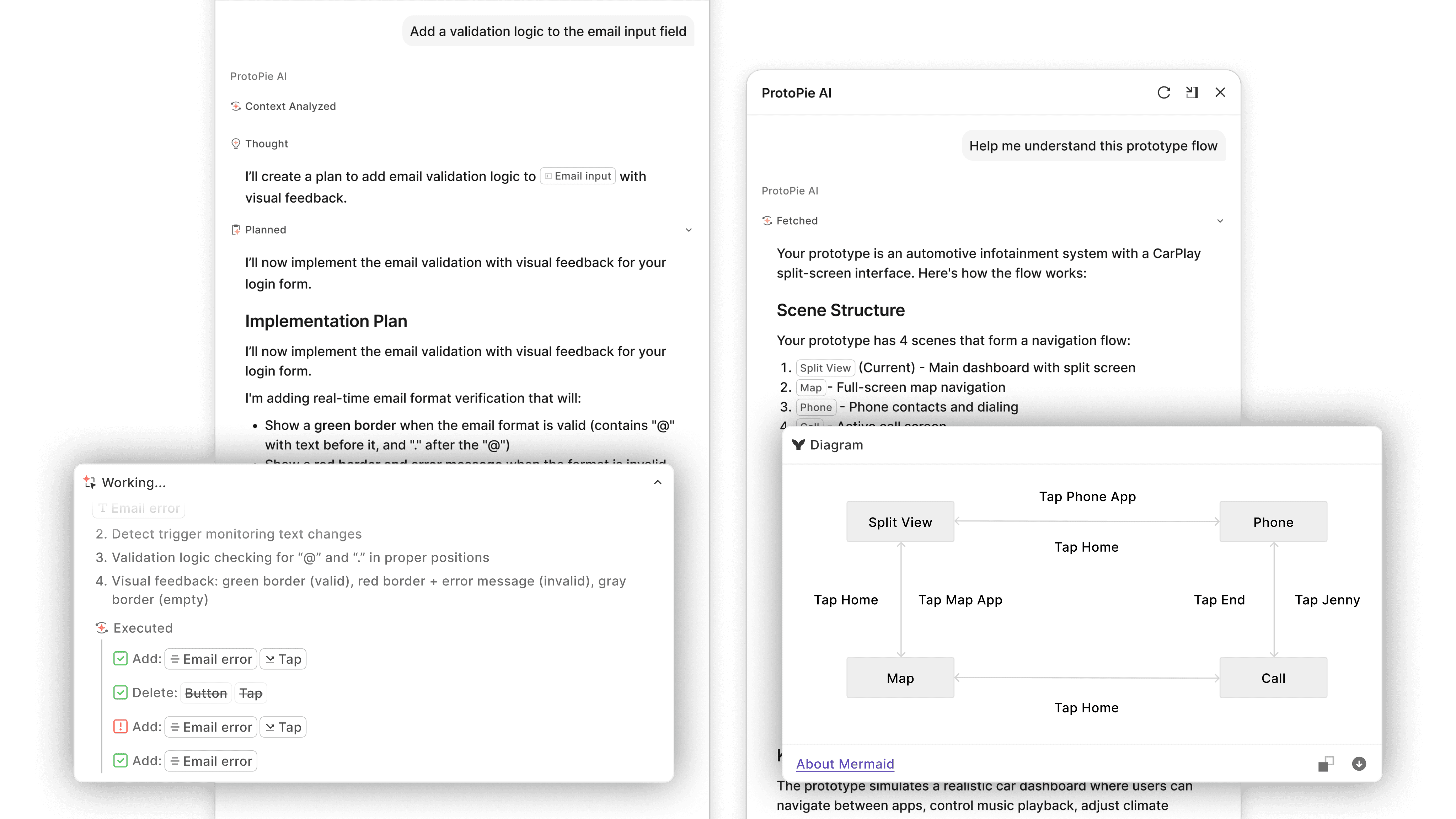
Authoring agent & Document agent comparison
Under the hood
The system is a multi-phase pipeline that routes, plans, and executes. When the user prompt comes in, a routing layer classifies it: is this a request to build something, or a question about how ProtoPie works? Those go to two different agents. The authoring agent creates and modifies prototypes. The document agent answers questions about ProtoPie features and formulas using RAG on our official documentation.
For prototyping requests, the pipeline assesses complexity. Simple tasks like color change or a tap-to-fade skip planning and executes right away. Intricate interactions like a shopping cart flow with quantity tracking, conditional promo codes, and multi-state transitions go through a full analyze-plan-execute pipeline.
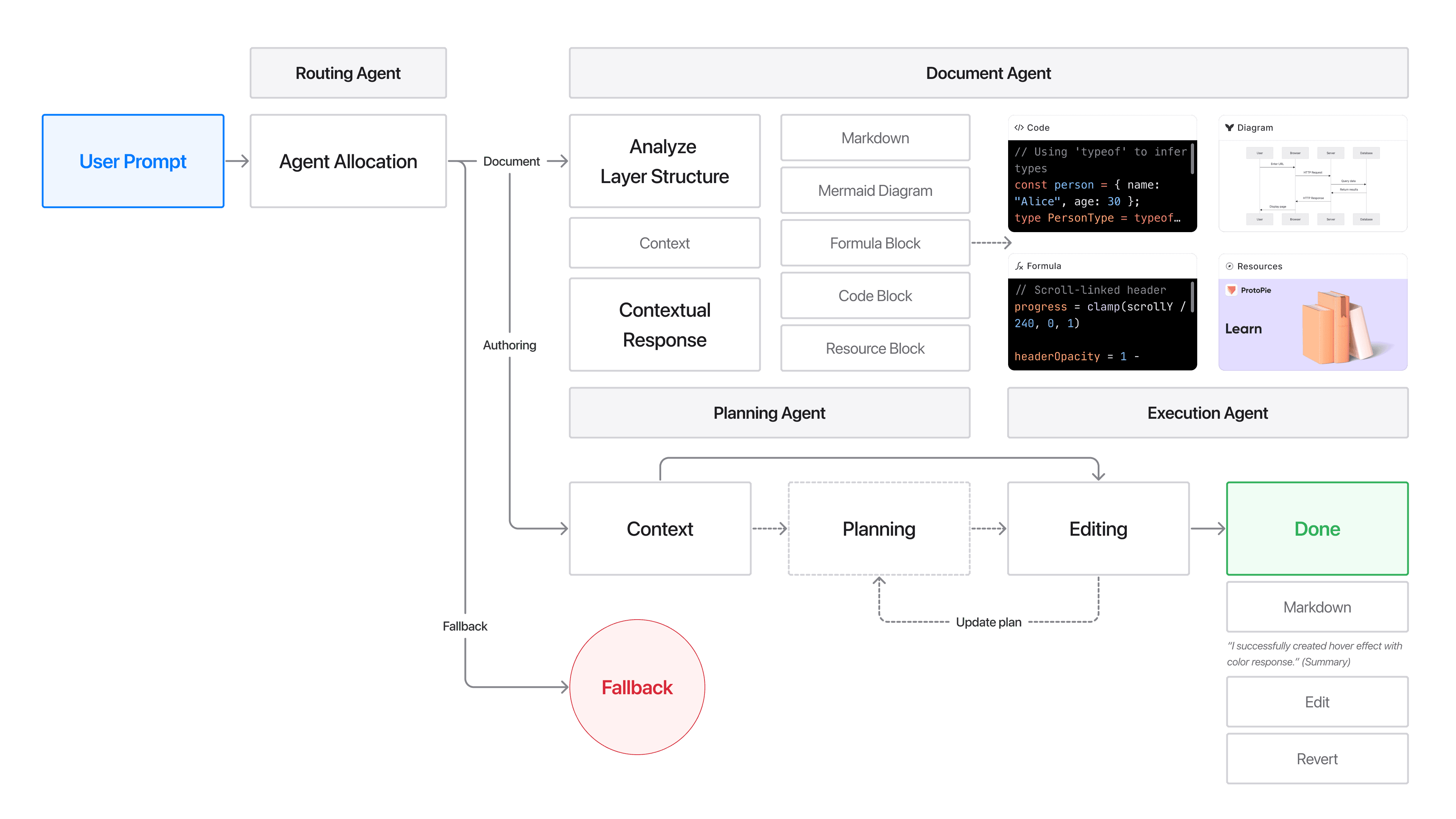
Architecture diagram: routing layer, complexity assessment, execution pipeline
Teaching AI a language it's never seen
Coding assistants generate Python or JavaScript, languages LLMs have trained on for years. ProtoPie AI generates Triggers, Responses, Formulas, and layer hierarchies. No LLM has seen those before. The model didn't know what a "Start trigger with an Assign response" meant in ProtoPie's context.
I worked with the product design team to build a pattern library: about 600 interaction examples and over 3000 user prompts, from basic tap animations to carousel logic with snap points. Each pattern maps a natural language description to the right combination of ProtoPie building blocks. When a designer types "toggle switch," the AI pulls the exact trigger-response structure for a toggle. When someone types a "dropdown component," it pulls that pre-mapped combination. The more specific the vocabulary, the better the output. This became the RAG knowledge base that powers both the authoring agent and the document QA agent.
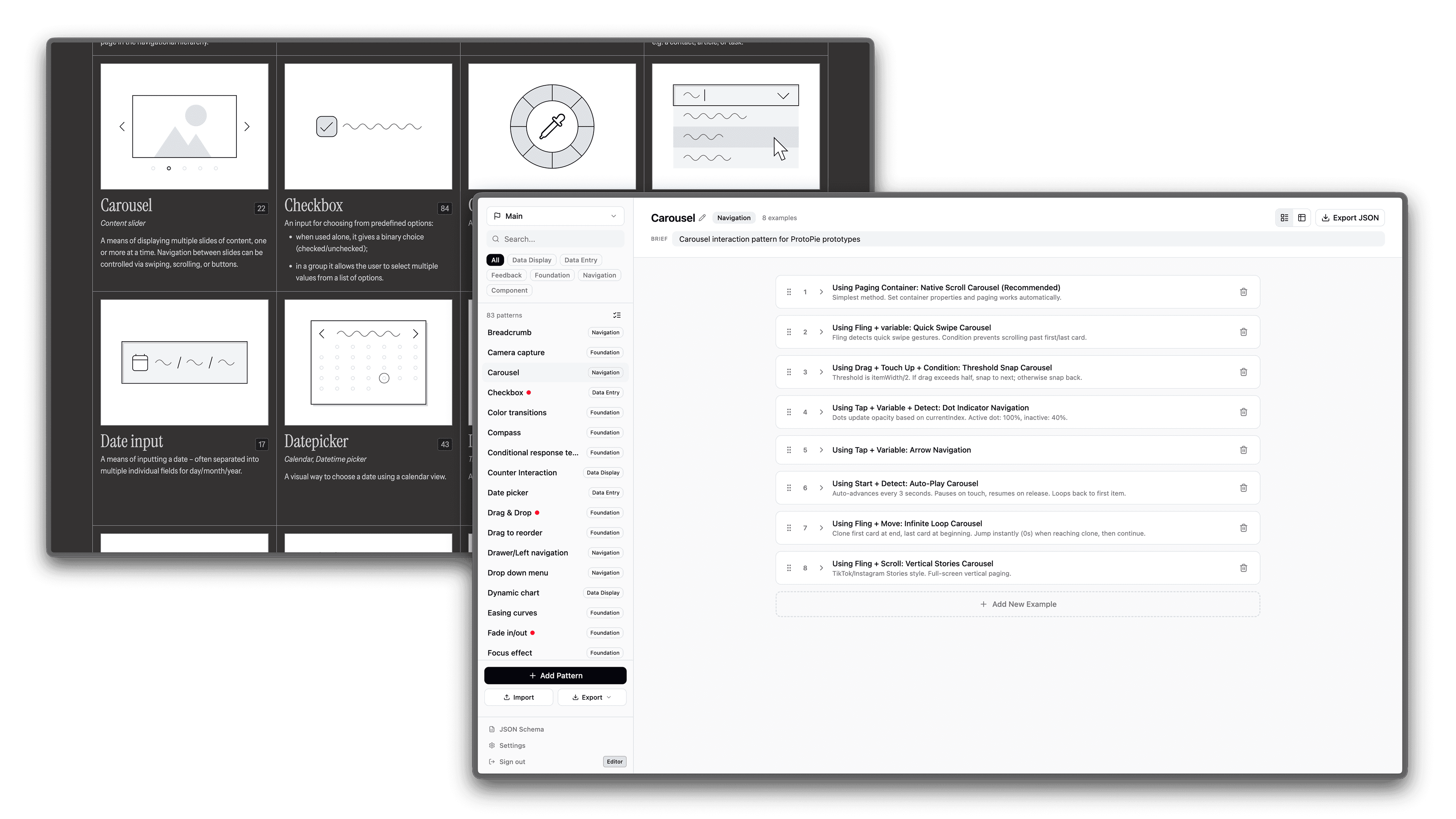
RAG dataset pattern library management
The webinar
After the beta launch, I led the global webinar for ProtoPie AI. As the only Creative Technologist who had contributed to the AI development, I understood the architecture and the product well enough to present it to a live audience.
The feature was still in beta, so I needed to build a demo environment that could hold up under live conditions. I pre-mapped the correct interaction blocks to the specific prompts I'd use during the webinar, so the model had guided knowledge of which triggers and responses to assemble for each demonstration. Same pipeline, same designs, with guardrails to keep things reliable on camera.
I designed the demo around three prototypes: a CarPlay interface, a Phone Key (Apple Wallet), and a vehicle cluster display. Instead of building them one at a time, I prompted AI in one prototype and switched to the next while it processed. The audience watched me work across all three concurrently, showing how users would use the tool for real work.
Once all three were built, I connected them through ProtoPie Connect to show the full user journey across the ecosystem, then brought everything into ProtoPie Cloud and walked through the User Testing workflow.
Reflection
Working on ProtoPie AI gave me a real understanding of how RAG pipelines and LLMs work in practice. I built a knowledge base that had to perform under production constraints. I learned what happens when you feed a model domain-specific language it's never seen, how the structure of your training data shapes the quality of every output, and where the gap is between what a model can generate and what a user can trust.
But the bigger lesson was about the work around the technology. Building the controlled demo, presenting a beta feature to a global audience, knowing which parts to show and which to hold back. Those decisions didn't come from a model. They came from understanding the product at every level, from the codebase to the client conversation, and making judgment calls that no prompt could handle.